Know which AI tools people are paying for, and whether anyone approved them
Three states with unknown as the default, an owner on every entry, coverage on its own axis. The head of IT asked which AI tools the business has approved The approval that happened is in a thread somebody can nearly find. Meanwhile a tool nobody signed off renews on a card and a leaver's seat is still billing.
The approval happened. The record of it is a thread.
Somebody asked, somebody senior said yes, and the record is a message in one of their mailboxes, which cannot be queried and cannot be handed to a successor. The alternative is a discovery tool whose findings list has no idea which destinations the business already approved and pays for, so the signal is buried under the company's own spending.
4 steps, in this order.
Write down the approvals you have
One entry per exact vendor, tool, team and owner email. Approving a tool for one team does not approve it for everyone.
Leave the rest as unknown
Unknown is the default and is not an accusation. A permissive empty state launders whatever is already happening.
Check it against money
Charge lines carry the same attribution, so a line nobody registered stands out. This finds the renewal whose buyer has left.
Read coverage before findings
The radar draws on five evidence sources. Only one of five coverage states permits an unqualified all-clear.
See how the register informs seat-spend findings.
See the three states and the coverage axisBuilt for
- A business where one team owns the estate, and the approval lives in somebody's inbox.
- Anyone who has to name the person who decided, not just the decision.
- Anyone who would rather have five unaccounted things than every destination the building reached.
Wrong for
- Anyone who wants to read what staff typed into a browser AI tool. A network feed gives a destination, not a transcript.
- Anyone who wants marking a tool prohibited to stop people using it. It records the decision and enforces nothing.
- Anyone who needs the register to prove a tool was authorised at the time it was used.
One thing on the record
One command registers an approved subscription and a prohibited one, imports invoice lines against them, and asserts a caller scoped to Engineering cannot see the Finance evidence.
The free cloud trial starts at workspace creation and needs no server installation. The current portal creates an owner/admin workspace; colleague invitations and organization membership management are not exposed in self-service setup.
Where this is publishedThree states, and coverage is not a fourth one.
The register stores three authorization states and only three. What people reach for as a fourth is a fact about a SOURCE rather than about a decision: whether a feed is connected, delivered recently and carried any rows are coverage questions, answered on their own axis with five values of which exactly one permits an all-clear.
- Approved
- A person decided this exact vendor, tool, team and owner combination is legitimate. A report that keeps alarming about it gets muted.
- Prohibited
- A person decided this one is not permitted. Matching evidence carries that classification, which is a finding worth somebody's time.
- Unknown
- The default. A named person has yet to make an approval decision.
- Unobserved
- Not a register state at all. A coverage fact about a source nobody connected, reported as unknown rather than as clean.
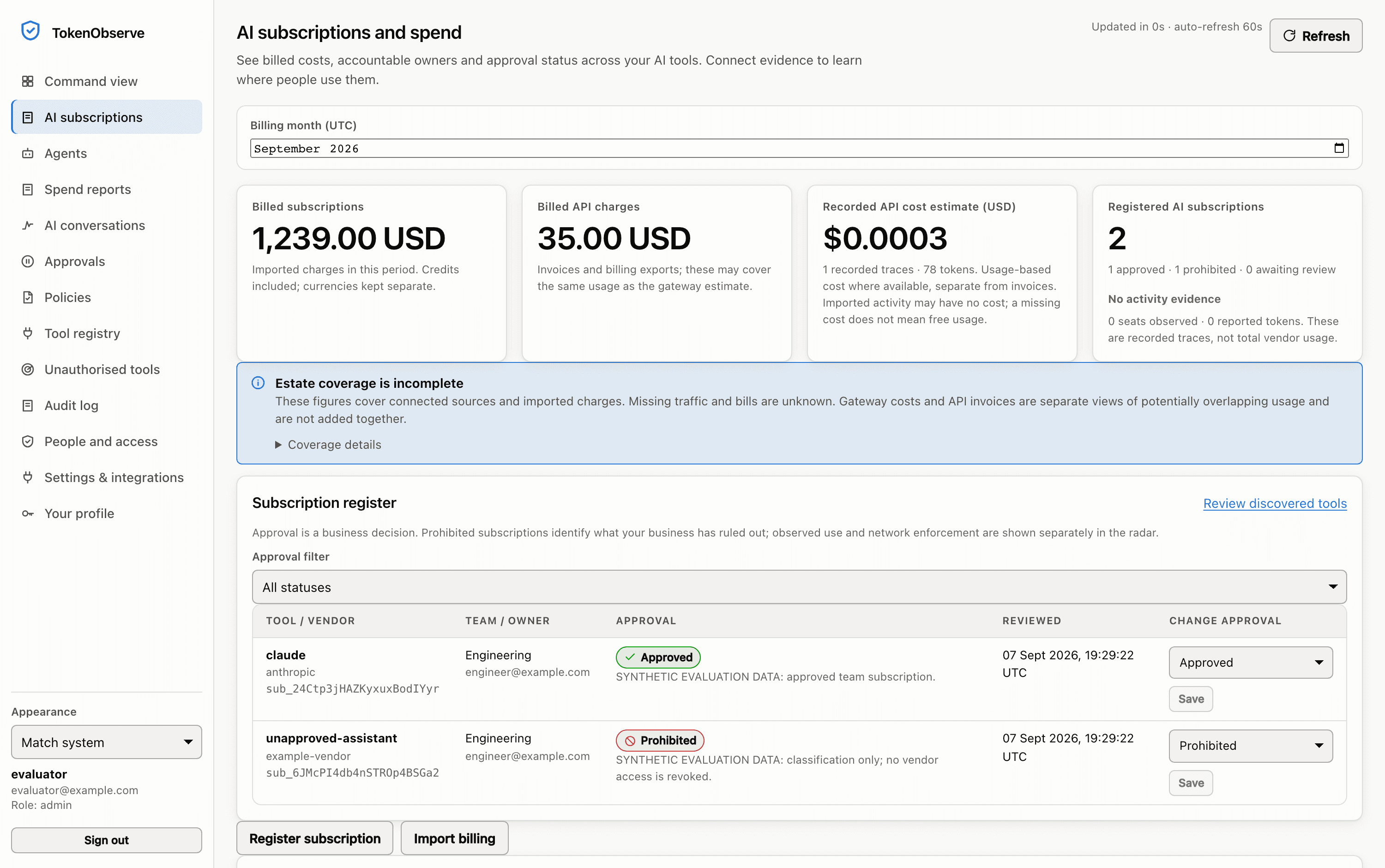
Sample data in the real Token Observe interface, recorded from a local evaluation with a temporary database, a mock provider and one request. No live provider key was used. The product stamps its own demo rows SYNTHETIC EVALUATION DATA in these pixels.
Approval records a decision. It enforces nothing.
Registering a subscription does not cancel it or reclaim a licence, and marking a tool prohibited does not stop anyone opening it in a browser. What approval changes is the noise: where per-user seat spend is reported from an invoice you supplied, a matching approved entry suppresses the finding. That suppression lives in that one detector; billing reconciliation, network egress, the key audit and IDE telemetry do not read the register.
4 things this still does not solve.
- It does not stop anybody using a tool. Marking a service prohibited classifies later evidence; it enforces no control at the vendor and none on an endpoint.
- A hostname is not a verified employee identity, so observed traffic cannot establish whose use is authorised. Mapping feeds to real people is remaining work.
- No report here is a complete claim about the estate. A source nobody connected is unknown rather than zero, and an absence of findings is not an assurance.
- Approval is the current decision only. It makes no statement that use before the decision was permitted.
Check the product limits alongside the job you want to do.
What we do not claimThe parts that do the work.
Approved and unauthorised AI
Approved, prohibited or unknown, so the subscriptions you already pay for stop arriving in the seat-spend report.
That a particular person's subscription is authorised
Shadow AI radar
Five evidence sources for AI activity that never touched the gateway, and a coverage model that refuses to call a dead feed a clean estate.
Only as current as the export it was computed from
AI spend and subscriptions
What you were billed and what you were metered, recorded as two numbers and never added into one.
A subscription that is on no invoice you give it
Questions
Will it report our team's paid subscription as shadow AI?
Not once it is registered as approved: where per-user seat spend is reported from an invoice you supplied, a matching approved entry suppresses it. The scope is narrow: that suppression lives in the per-user seat-spend detector, not across the whole radar, so billing reconciliation, network egress, the service-account key audit and IDE telemetry findings do not read the register.
Is there a fourth state for tools we have not observed?
No. The register stores three authorization states (approved, prohibited and unknown), and coverage is a separate axis with five values across six evidence streams. Unobserved is a fact about a source rather than a decision about a tool, and it reads as unknown rather than as clean.
Can we see what people are typing into ChatGPT or Claude in a browser?
No, and it is better to hear that now than in week three. A network feed reports that a destination was reached; there is no browser agent, no endpoint capture and no proxy that reads a session. A hostname is not a verified employee identity either.
Describe the version of this you have.
Say what your estate contains and which part of it worries you, and the reply will say where to start.