Find out what AI costs this business, line by line
A vendor, a tool, a team and an owner on every line. Billed kept apart from metered. The head of IT who owns the AI line on the card statement The board gets a number off the statement and it holds for ten seconds. Which teams, which tools, who signed them off: that answer is a spreadsheet nobody has updated.
Finance owns the total. Nobody owns the shape.
The card statement gives you a total and it is right: money moved. What it does not hold is which team, which tool and who decided, so the second question in the meeting is the one that lands. The usual answer is a spreadsheet that was accurate the week it was made.
4 steps, in this order.
Register what you know about
One entry per vendor and tool, with a team and an owner email, in one of three states: approved, prohibited or unknown.
Map the export onto the template
Ten required columns: external id, vendor, tool, team, kind, currency, amount, charge date and the two service-period dates. Owner email and subscription id are optional.
Import it, and read what it refuses
The dashboard previews the parsed lines first. Unrecognised columns are refused, bounded at 1,000 lines, and rolled back whole.
Read billed and metered apart
Billed reports per currency, subscription and API in separate columns. Vendors you have not imported are unknown, not nothing.
Once your first invoice is in, explore the spend reports.
See how a charge is recordedBuilt for
- An AI bill of several subscriptions plus a metered API account, often in more than one currency.
- A finance export you can map onto a template, and invoices you can download.
- Anyone who must name a team and an owner per line rather than produce one total.
Wrong for
- Anyone who wants subscriptions discovered. An import finds what the invoice lists; anything else stays unknown.
- Anyone who needs one blended AI number. A charge and an estimate are never added, and no exchange rate is applied.
- Anyone expecting it to cancel a subscription or reclaim a seat. Only the vendor ends an entitlement.
One thing on the record
One command imports a synthetic invoice, imports it again and asserts the second adds nothing, then asserts billed subscription and API amounts are reported separately.
The free cloud trial lasts 30 days from workspace creation, with no card or server installation. Connect one supported billing source and check its periods, currency and collection status.
Where this is publishedA bill and an estimate are never added together.
An invoice is money that has already moved; a metered estimate is a calculation over observed traffic. Adding them produces the single figure an executive asks for and a number that reconciles against nothing. That is how a spend tool loses its credibility over arithmetic.
- Billed
- What an invoice line says, per currency, with its charge date and service period. Retained without proration.
- Metered
- What gateway traffic is calculated to have cost, against price rows you hold. Never folded into the billed figure.
- Unknown
- A source nobody connected. Reported as unknown rather than zero: those look identical on a chart and mean opposite things.
- Never produced
- A blended total, or a converted multi-currency one. No exchange rate is applied anywhere.
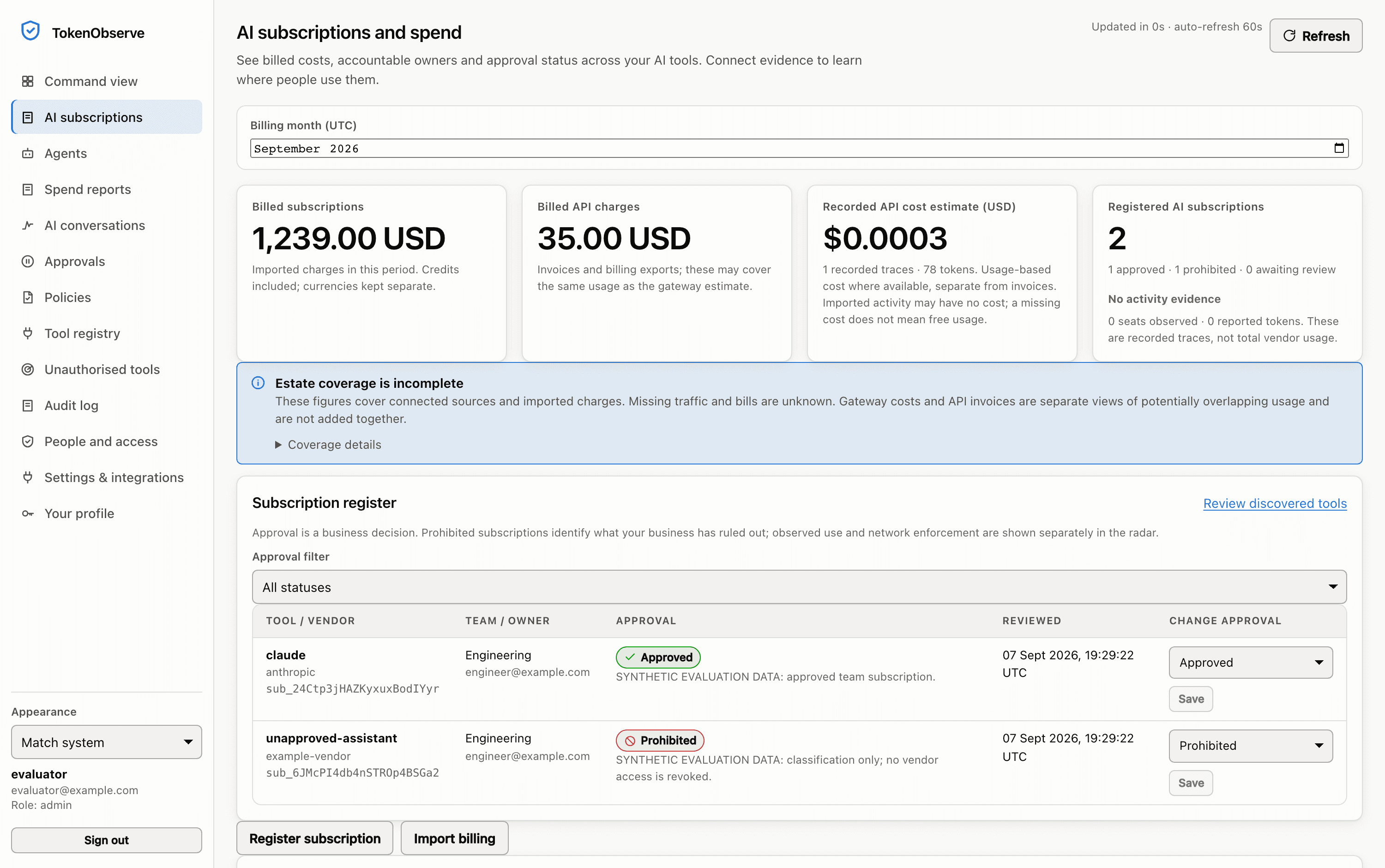
Sample data in the real Token Observe interface, recorded from a local evaluation with a temporary database, a mock provider and one request. No live provider key was used. The product stamps its own demo rows SYNTHETIC EVALUATION DATA in these pixels.
The same export imported twice adds nothing.
Identity is team, source and external id together, so an identical reimport contributes no spend. A reimport reusing an identity with different data is a conflict rather than an update and the whole import rolls back. Corrections are separately identified credit lines, which keeps the ledger append-only.
4 things this still does not solve.
- An import finds what the invoice lists. A personal card, a free tier or a vendor you have not exported stays unknown until another source finds it.
- The cloud pilot connects supported provider billing reporting sources. Their reported costs stay separate from gateway estimates calculated against configured price rows; missing or partial evidence is unknown, not zero.
- It does not reduce the bill. Nothing here routes, caches or downgrades a model to save money, and no percentage saving is claimed anywhere.
- The register records the current decision. It is not an attestation that earlier use was permitted, and it cannot cancel a subscription.
Check the product limits alongside the job you want to do.
What we do not claimThe parts that do the work.
AI spend and subscriptions
What you were billed and what you were metered, recorded as two numbers and never added into one.
A subscription that is on no invoice you give it
Approved and unauthorised AI
Approved, prohibited or unknown, so the subscriptions you already pay for stop arriving in the seat-spend report.
That a particular person's subscription is authorised
Spend controls
Hard USD ceilings, per-minute rate limits and a kill switch, all decided before the request leaves your network.
One billable egress: no retry, no failover
Questions
Does this connect to our finance system or our vendor billing accounts?
Cloud billing uses the provider's required reporting credentials. The separate invoice-import path needs no billing credential: map the charge lines out of the export finance already produces onto the import template with ten required columns and two optional columns, as CSV in the dashboard or JSON over the API, so there is no billing connector to authorise and no vendor admin credential in the path. An import then finds what the invoice lists, and nothing else.
Why will it not give us one total for AI?
Because the two things it holds are different measurements. Add a £120 subscription to £340 of estimated tokens and £460 appears nowhere else in your business: not on the vendor invoice, and not in the gateway.
Can we trust a low number, or a screen with nothing on it?
Only as far as your coverage. A source nobody connected reads as unknown, never zero, and the estate report's completeness flag is hard-coded false with its reasons beside it. Detail rows cap at 1,000 and any truncation is stated in the report.
Describe the version of this you have.
Say what your estate contains and which part of it worries you, and the reply will say where to start.